I haven’t typed a git command with any conviction in months. Claude writes the code, makes the commits, pushes them. I still open a git app several times a day, and every one of them greets me with a lane graph: colored lines, branch names, hashes. A beautiful answer to a question I’ve stopped asking.
The question I actually have is smaller. Is my work safe, and where is it?
Sprig is a Mac app built around that question. This piece covers the four things about it I think are worth stealing: the concept, the vocabulary, the way it uses Claude Code with no keys, and the pricing.
Two designs I threw away
The first design was a classic lane graph, because that’s what a git app is. I looked at it and saw developer complexity with nicer colors. The second was a branch timeline, which is the same picture turned sideways. Points on a line.
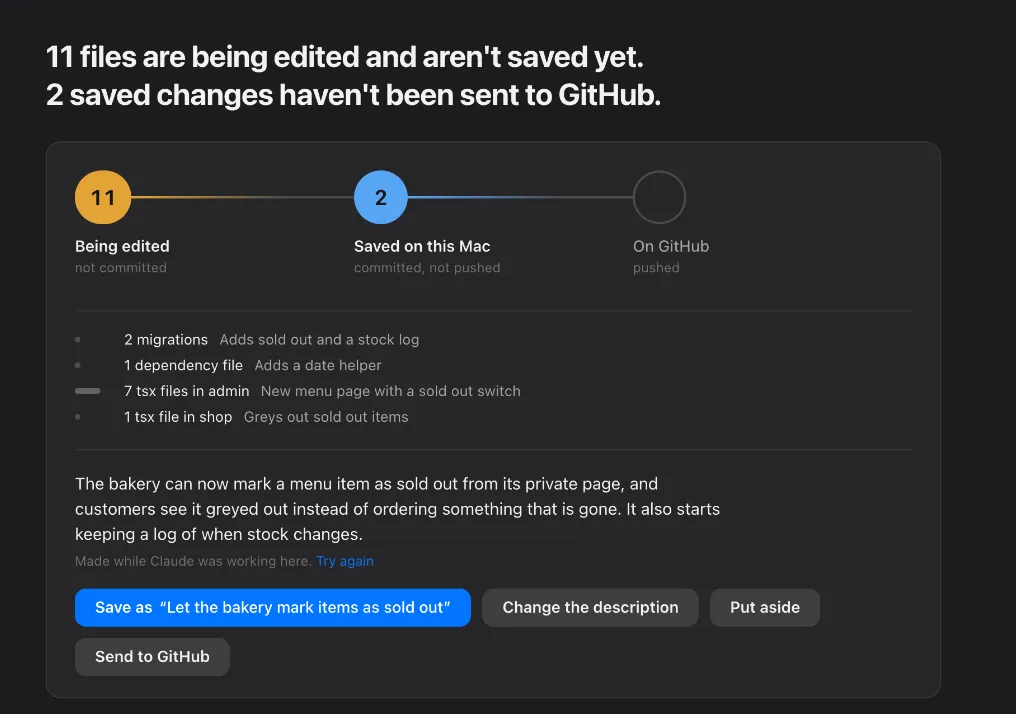
The third one is three boxes. Being edited, Saved on this Mac, On GitHub. Work moves left to right. If a number is sitting in the first box, something isn’t saved. If it’s in the second, it exists on exactly one computer. If the third box has a checkmark, you can close the laptop.
That’s the whole model. Other branches are “side projects” hanging off the main line. They’re never peers, because for someone working with an AI on main, they aren’t.
Plain words, git on hover
Every label had to pass one test: would someone who has never opened a terminal know what this does?
Commit became save. Push became send to GitHub. Pull became catch up. A branch is a side project, and a stash is something you put aside.
The git term is still there. Hover over “Saved on this Mac” and it says “committed, not pushed”. People who know git lose nothing, and people who don’t aren’t asked to learn it first.
Sizes got the same treatment. A save shows a small bar that’s longer for a bigger change. I didn’t want anyone squinting at +412 −88 and wondering if that’s a lot.
One right answer, or hand it to Claude
Early on I had to decide what Sprig is allowed to do to your project, and the rule that fell out is simple. If a job has exactly one right answer, Sprig does it. Sending saved work to GitHub has one right answer. So does catching up when nothing conflicts, or adding .DS_Store to the ignore list.
Anything that needs judgment gets written up as a prompt and handed to Claude. Two lines of work that have drifted apart is a judgment call. Sprig says so, shows you the prompt, and opens Claude Code on it.
I like this line because it’s honest about what each side is good at. And Sprig keeps its hands off a project entirely while a Claude session is writing to it.
No keys
This is the part I’d point other people building AI tools at.
Sprig has no API key field, no account, and no model picker. If Claude Code is installed on your Mac, Sprig uses it, the same one you’re already signed in to. When there are unsaved edits, it asks your Claude to read them and say what they do, in a sentence, plus a name for the save. One click saves it under that name.
The setup cost for the person is zero, and I think that’s most of why it feels like part of the same world as Claude Code and not another tool bolted on beside it.
The same connection is what makes my favorite feature work. Run Claude in a few projects at once and one of them is always stopped, quietly waiting on a yes. Sprig knows the moment that happens. The project jumps to the top and says Claude is waiting for you.
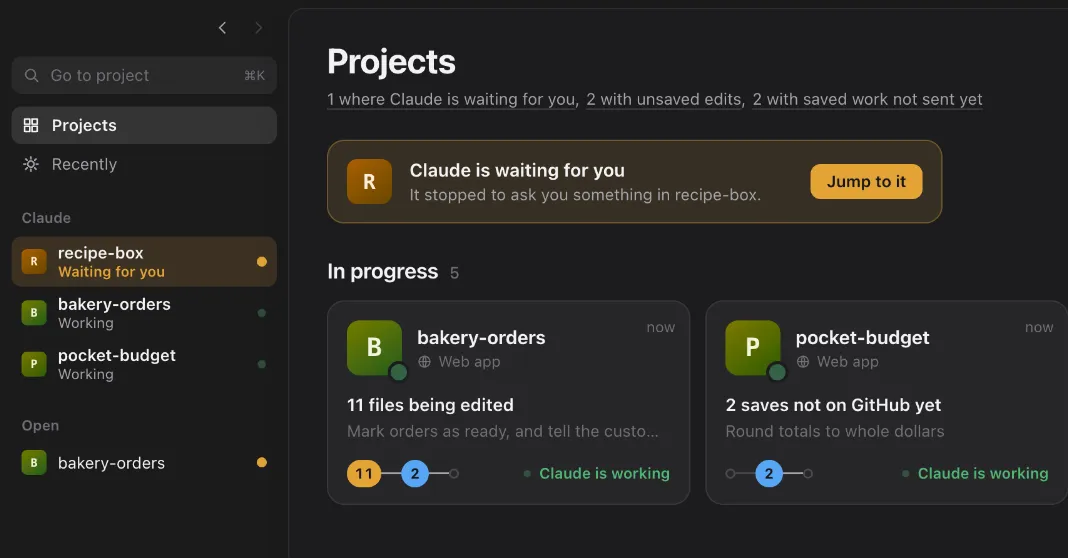
From there it was a short step to listing every session by name. Claude Code already names each one after the work (“pickup-time-reminders”), so Sprig shows those names, what each is doing, and a Jump to it that brings that exact terminal tab to the front.
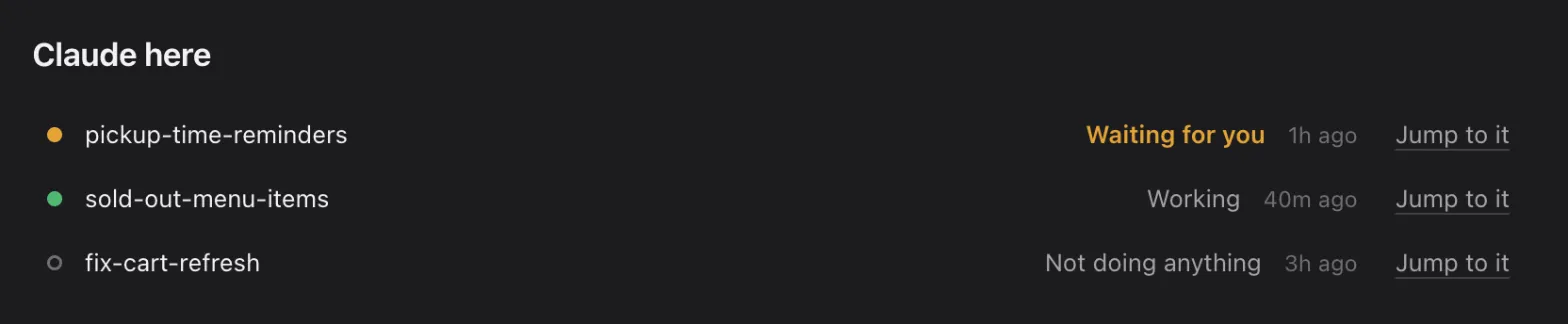
Jumping to a tab was the piece I expected to be impossible in my own terminal. Warp can’t be scripted the way Terminal and iTerm can. It turned out Warp quietly gives every tab its own link for exactly this. It’s mentioned in a changelog and missing from the main docs page. That one took real digging, and it’s the difference between “your session is somewhere in that window” and landing on it.
Sprig counts, Claude explains
One design moment is worth telling because I was wrong first.
I wanted a glance to tell me what kind of change I was looking at. “Oh, there are migrations in here.” “Oh, it rewrote a pile of admin screens.” My instinct was to have Claude produce that.
The pushback I got, from the agent building it, was that counting is the one thing you shouldn’t hand a language model. On a big change Claude only sees part of the diff, so it would miscount exactly when the count matters most. So it’s split. Sprig counts: 2 migrations, 7 tsx files in admin, exact and instant, updating live while Claude is still working. Claude adds a few words beside each line saying what that group is about.
Same line as before, really. One right answer goes to the tool, and judgment goes to the model.
The hard part was Apple
The app took a week. Getting it onto someone else’s Mac took most of a day, and none of that day was code.
Xcode insisted I wasn’t the account holder of my own developer account while Apple’s website, open in the next window, said I was. The password route for notarizing failed three times with a fresh password each time. What finally worked was an API key, which doesn’t care what your email address used to be. Then Apple held the very first build for an hour of extra checking.
The reward is that it never has to happen again. A release is now one command. Sprig checks for a newer version on its own, downloads it quietly, and offers a restart. I shipped three versions the first afternoon just because I could.
Ten free releases
My first pricing idea was to charge some function of the hours that had gone into the app. Early adopters get a deal while they support the work, and if it takes years, the price reflects that.
I got talked out of half of it, fairly. Time is a cost, and nobody wants to pay more because something took me longer. It also rewards being slow. And hours are a strange thing to measure when an AI is doing the typing. Sprig’s whole premise is that shift.
What survived is the part I cared about: early people get the best deal, and the number is public. So the price follows releases. Sprig is free for its first ten feature releases. Anyone who installs it in that stretch keeps it free for good. The site says which release this is, and each copy keeps a small note of when it first ran so a later version can honor the promise.
A feature release is one where the app gained something. Fixes in between don’t count, which means every tick of the counter stands for the app getting better.
Method, honestly
Built the same way as everything else here: I design and decide, agents execute. For Sprig I stayed out of the code on purpose. I described what I wanted in product terms, got it wrong sometimes, and expected to be argued with.
One week, November 19 to 25. Eighteen commits. About 5,500 lines of Rust and 4,400 of Svelte and TypeScript, with 35 tests. I did not write them.
It’s early and it shows in places. It’s Mac only. The session features lean on parts of Claude Code that are documented but young. The “installed early” note is on the honor system. All of that is fine for a tool whose first users are friends.
What it’s for
The claim underneath Sprig is that a lot of our tools are still shaped for the person who used to do the work. When the AI does the typing, the person’s job becomes knowing where things stand and deciding what happens next. A tool for that job is smaller and quieter than the one it replaces, and it should be.
Sprig is my attempt at one. It’s free while it’s early.